What makes ECT different from other online stores and shopping carts?
I shopped around and looked at many different shopping cart solutions, including osCommerce, ZenCart, and CubeCart, to name just a few. I was looking for an affordable ecommerce solution to offer to my small business clients that was both easy for them to administer and easy for me to install and customize. The best solution I've found is ECT. The code is very well written and modularized, which means I'm free to design custom websites and then weave in the ECT code, so that each client's shopping cart is customized to match their website. And the ECT after-purchase support is simply fabulous - I usually get answers to my questions the same day. They continually strive to improve their product and offer 6 months of free updates, and many neat after-market add-ons are available for purchase (like digital downloads, minicart, etc).
Some additional features - (per ECT manual) - for full list, see Comprehensive Feature List below
Discounts & Coupons: Discounts and coupons are powerful marketing tools that allow you to give your clients special offers on products or categories, allow wholesalers to purchase at special rates, provide incentives through your offline advertising or help clear "difficult to sell" stock amongst many other uses. Once you have set up the discounts and coupons you wish to use on your store you can go back to the product / category admin pages to assign the ones you want to use.
Wholesale Pricing: A product's wholesale price is used in conjunction with the customer login feature and will be the price that logged in customers will see. As the store administrator, you can select which customers see the wholesale prices, and what the wholesale price is for each product.
Drop Shipping: Drop shipping allows you to group products per manufacturer, designer, dropshipper etc., keep track of the sales per group and includes the ability to send an email notification when a particular order is placed through your store. This may be to the drop shipping company, a manufacturer, a contributor or anyone really you need to notify of a sale.
Cross Selling: Cross selling allows you to show "recommended", "best selling" and "related" products as well as the items "also purchased by" previous customers on the cart page. This feature is particularly useful for upselling products and is extremely flexible and configurable.
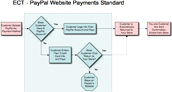
Using PayPal and ECT: The Difference Between STANDARD and PRO
How does ECT and
PayPal Website Standard Work?
(Click to enlarge the flowchart)
 |
PayPal Website Payments Pro
PayPal Website Payments Pro allows your clients to stay on your website for the entire transaction if they opt to pay via credit card. Because you are sending credit card information to PayPal from your cart, you will need to purchase a SSL certficate for your website, to securely send this info. |
Helpful ECT Links
- Comprehensive Feature List - <-- Prospective clients: Please read over this list!
- Supported Payment Providers (PayPal, Google Checkout, Authorize.net, etc)
- Paypal Website Payments Standard Configuration (free, leaves your site to pay)
- Paypal Website Payments Pro Configuration (monthly fee, stays on your site, requires SSL)
- List of Configuration Options
- General Help
- Shipping Method Help
-- Setting Up USPS Shipping (register with USPS to get username, get on Production Server, put username into Main Settings, select Shipping Type as USPS in Main Settings (or if more than one shipping carrier, modify includes.php), modify Shipping Methods. - Note other configurable settings available, look in List of Configuration Options.
-- Setting Up UPS Shipping (from Admin area: look for this sentence "Please note, for UPS shipping, you have to use the registration form here." and click on the "here". Next select Shipping Type as UPS in Main Settings (or if more than one shipping carrier, modify includes.php), modify Shipping Methods. - Note other configurable settings available, look in List of Configuration Options.
-- Setting Up FedEx Shipping (In Main Settings, select Shipping Type as FedEx (or if more than one shipping carrier, modify includes.php). Click on Shipping Methods, and click on Register with FedEx (you'll need to have a FedEx Account Number already assigned to you.
-- Setting Up Flat Rate Shipping: (Choose "Weight Based Shipping" (or if more than one shipping carrier, modify includes.php), Set all product weights to 1, modify Postal Zones, Edit Rules)
- Download PDF version Manual
|

 and all purchases will be refunded - it's a demo!