Meet the author: Jill Olkoski
Jill has a MA in Clinical Psychology, a BS in Computer Science, and a BS in Mechanical Engineering.
She currently owns Aldebaran Web Design in Edmonds (near Seattle WA) and enjoys educating her clients on topics related to small business website design.
In Jill's previous life, she spent 17 years in the engineering and quality organizations of a Fortune 100 tech company.
Here’s a great tip for viewing what’s in Google’s index:
site:yourwebsite.com
Here are some varations:
site:yourwebsite.com word
This returns all pages that have “word” on them.
Example: “site:aldebaranwebdesign.com jill” will show all the pages on my site that are in Google’s index that contain the word “jill”.
site:yourwebsite.com inurl:word
This returns all pages that have “word” in the URL of the page.
site:yourwebsite.com -inurl:word
This returns all indexed pages except where “word” is part of the page’s URL.
Example: “site:aldebaranwebdesign.com -inurl:blog” will show all the pages on my site that don’t contain the word “blog” in the path.
Posted in SEO and PPC, Tidbits | Comments Off on Show What’s in Google’s Index with Exclusions
I had two clients alert me that contact forms on their BlueHost hosted websites were generating errors. One was using WordPress and Contact Form 7. The other was using a regular mail form script using the PHP Mail function, using secure auth, with PEAR and AUTH enabled. The contact forms used to function, so I checked the version of PHP. Both broken contact forms were running PHP 5.6 - yet other clients who were running 5.4 were having no issues.
I contacted BlueHost tech support and reported this, and they said it was my script. I told them no, it wasn’t, it used to work and now it’s broken, and 5.4 works and 5.6 doesn’t. They said I could revert back to 5.4, and I said why don’t they fix what’s wrong with 5.6. They told me to submit a ticket, that was a week ago no reply.
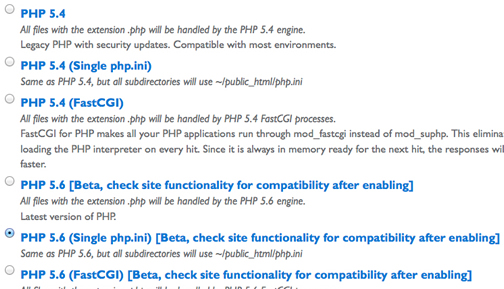
Today I logged in and to my surprise, this is what I saw:
So BlueHost is moving folks to 5.6, which is in BETA, breaking scripts, and when you call in for help, they tell you it’s the script, not the version of PHP.
Maybe if more folks complain, they’ll actually fix 5.6 and not migrate anyone without telling them.
Posted in Tidbits | Comments Off on BlueHost PHP 5.6 Breaking WordPress Contact Forms and Other Mail Scripts
I was working on my new website: SoloDogs.net, and needed to have a series of three images. I wanted the desktop version to be centered on the page. I wanted the mobile version to have each image also centered, but stacked one on top of another. I also wanted the text below the images to be beneath the last image, no matter what. Here’s the solution:
Here’s a great tip on how to password protect a zip file on a mac so that you can email it to someone safely.
1. Open a Terminal Window (Applications -> Utility -> Terminal)
2. Type zip -er FileNameYouWantOfZippedFolder.zip
3. Put a space after the .zip above
4. Drag and drop the folder you want to zip into the Terminal window
5. Hit return
6. Enter password
7. Verify password
8. The file will be created in a default location, under your user account.
Alternatively, you can cd to whereever the file is in the Terminal window, then zip the file, and it will put it where you cd’d to.
The entire syntax:
zip -er MyNewZipFile.zip SuperSecretFolder
Posted in Tidbits | Comments Off on Mac Tip: How To Password Protect A Zip Folder So You Can Email It Safely
Sometimes you install WordPress in subdirectory, as in when you are converting a person with a pre-existing website to a WordPress website. Generally to keep things clean, you install WordPress in a subdirectory, and then move the content into WordPress. When you’re finished, you now need to “launch” the new website, but have it appear that WordPress was installed into the root directory.
If your website is hosted by BlueHost, this post may help you avoid a problem I had with a client’s website when we attempted to download a backup of the website and expand it.
My beloved dog has some health issues that has required me to monitor her around the clock. As she’s improved I’ve been contemplating how to again regain my freedom and be able to leave the house for short periods of time. But I wanted to know that she was safe in her enclosure and not in distress. I figured out how to use FaceTime and call my MacBook laptop with my iPhone and to see what she was doing.
Sometimes you want to display the last few posts of a WordPress blog on a regular website page, assuming the WordPress installation is in a sub directory of the website. This is an alternative to using an RSS to HTML method. I’m saving the code here for myself, and in the event it helps another developer.